: macOS app · by Arcadia:Designapp per macOS · by Arcadia:Design

One long video.
Ready-to-post clips.
Un video lungo.
Clip pronte da postare.

Paste a link or drop a file. Clip:Design listens, finds the chapters, cuts on word boundaries and burns in karaoke subtitles — then writes the captions for your socials. All on your Mac. No subscription. Incolla un link o trascina un file. Clip:Design ascolta, trova i capitoli, taglia sui confini delle parole e incolla i sottotitoli karaoke — poi scrive le caption per i tuoi social. Tutto sul tuo Mac. Senza abbonamento.

Get Clip:DesignAcquista Clip:Design See how it worksCome funziona Free version available · Pro: one payment, no subscriptionVersione Free disponibile · Pro: un solo pagamento
Apple Siliconoffline9:16 · 1:1 · 4:5 · 16:9WhisperIT / EN
Clip:Design — demo
01 How it worksCome funziona

Five steps. One folder.Cinque passi. Una cartella.

1 / INPUT

Paste or dropIncolla o trascina

A YouTube link or a local file — MP4, MOV, MKV.Un link YouTube o un file locale — MP4, MOV, MKV.

2 / ANALYSIS

It listensAscolta

Local Whisper transcribes with the timing of every single word.Whisper in locale trascrive con i tempi di ogni parola.

3 / CHAPTERS

You pickScegli tu

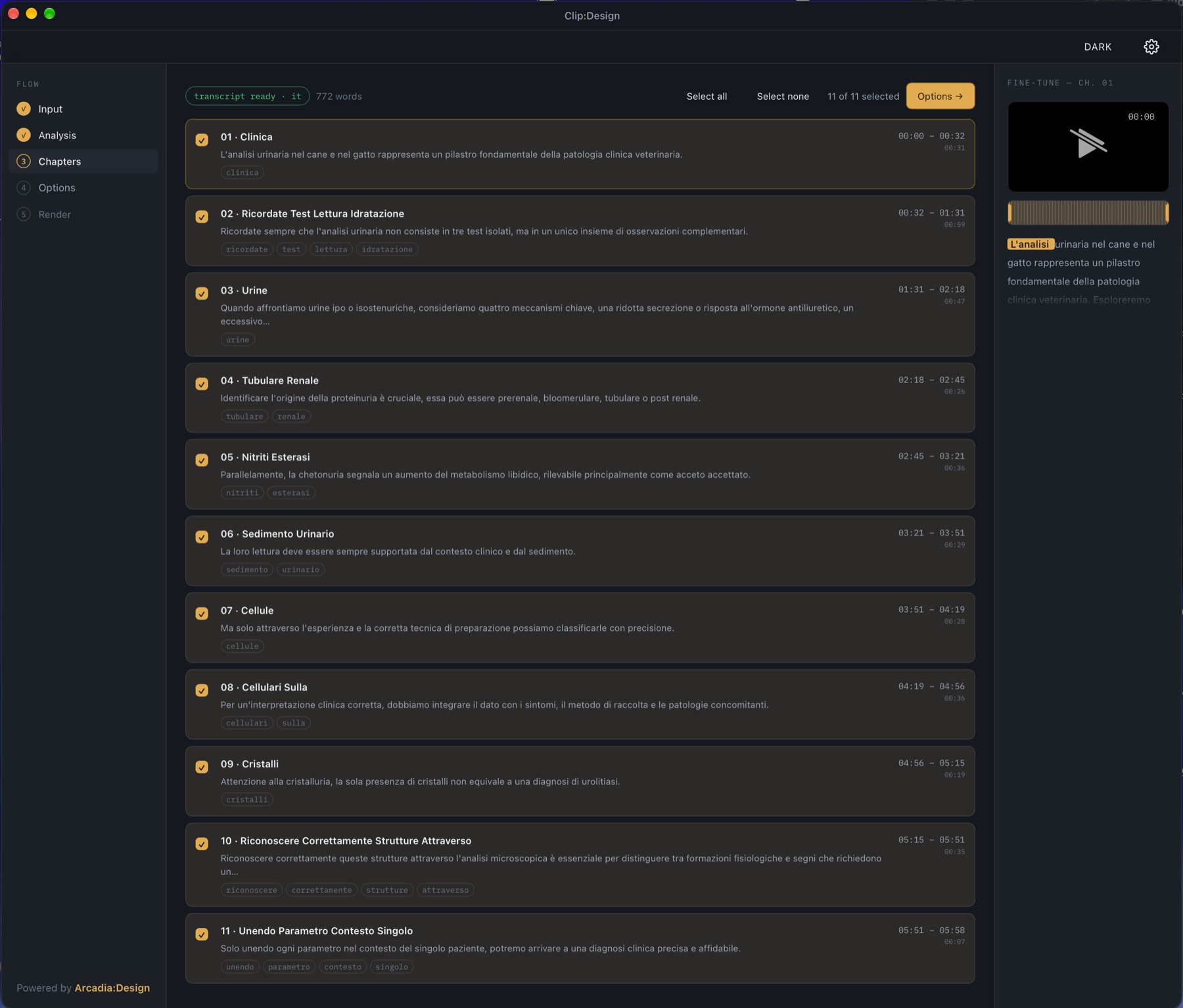
It proposes the best segments. Tick, then fine-tune in/out: the cut snaps to words.Propone i segmenti migliori. Spunti e rifinisci: il taglio si aggancia alle parole.

4 / OPTIONS

Shape itDai forma

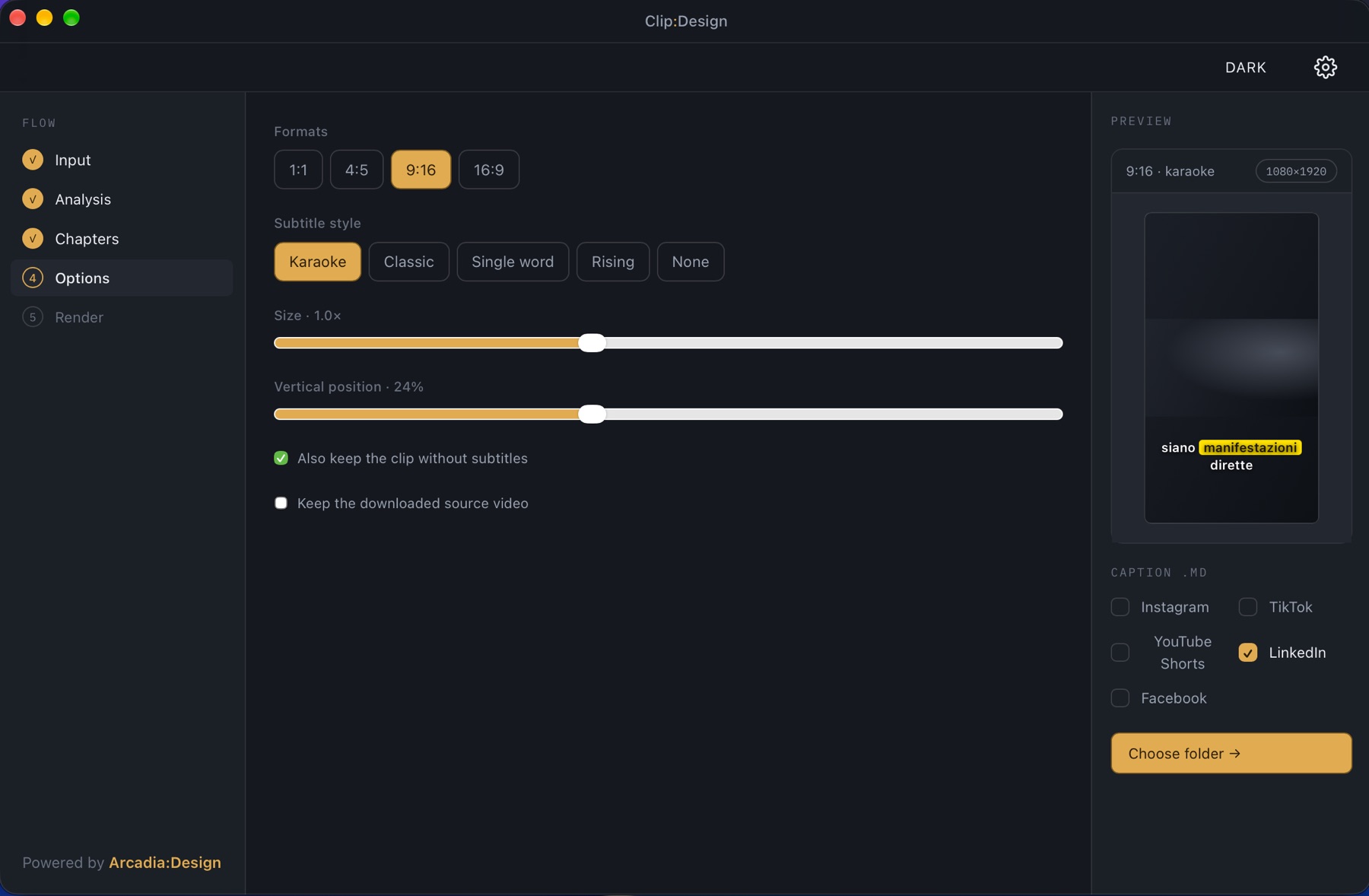
Aspect ratios and subtitle style, with a live preview.Formati e stile dei sottotitoli, con anteprima dal vivo.

5 / RENDER

DoneFatto

Clips plus a caption file per platform, in a tidy folder.Clip più un file di caption per piattaforma, in una cartella ordinata.

02 The real appL'app vera

Cuts that land on words, never mid-syllable.Tagli sulle parole, mai a metà sillaba.

Drag the in/out handles on the mini-player: they snap to the nearest word while the transcript scrolls in sync. Pick your format and style, see it before you render.Trascina i marcatori di inizio e fine nel mini-player: si agganciano alla parola più vicina mentre la trascrizione scorre. Scegli formato e stile, vedili prima del render.

Clip:Design
Clip:Design chapters screen with the fine-tune mini-player
03 · chapters + word-snapping mini-playercapitoli + mini-player con aggancio alle parole
Clip:Design
Clip:Design options screen with format and subtitle style
04 · formats, subtitle styles, live previewformati, stili di sottotitolo, anteprima
03 Why it's differentPerché è diverso

Built to stay on your machine.Fatto per restare sul tuo computer.

0

accounts, uploads or telemetryaccount, upload o telemetria

1×

one payment, no monthly feeun solo pagamento, nessun canone

5

caption files: IG, TikTok, Shorts, LinkedIn, Facebookfile di caption: IG, TikTok, Shorts, LinkedIn, Facebook

M1+

Apple Silicon, Metal-accelerated, signed & notarizedApple Silicon, accelerato con Metal, firmata e notarizzata

01

Local-firstLocal-first

Transcription and rendering run on your Mac. Your footage never leaves it.Trascrizione e render girano sul tuo Mac. I tuoi video non ne escono.

02

Sensible cutsTagli sensati

Clips start and end on whole words and close on a complete sentence.Le clip iniziano e finiscono su parole intere e chiudono a fine frase.

03

Captions that don't sound like a robotCaption che non sembrano scritte da un robot

Pro: plug in a local model with Ollama, or your own API key, and captions are rewritten from what is actually said.Pro: collega un modello locale con Ollama, o la tua chiave API, e le caption vengono riscritte da ciò che si dice davvero.

04 Free / Pro

Try it free. Own it forever.Provala gratis. Tienila per sempre.

Free

FreeGratis

No watermark. No time limit.Nessun watermark. Nessun limite di tempo.

  • 9:16 vertical outputUscita verticale 9:16
  • Karaoke subtitles with size and positionSottotitoli karaoke con dimensione e posizione
  • 1 clip per project, 1 caption file1 clip per progetto, 1 file di caption
  • Local transcription (Base model included)Trascrizione locale (modello Base incluso)
Get the Free versionScarica la versione Free
Pro

Pro

One payment, yours forever. All 1.x updates included.Un solo pagamento, tua per sempre. Aggiornamenti 1.x inclusi.

Early bird: the first 50 licenses get a lower priceEarly bird: le prime 50 licenze a prezzo ridotto
  • All formats: 9:16, 1:1, 4:5, 16:9Tutti i formati: 9:16, 1:1, 4:5, 16:9
  • All subtitle styles: karaoke, classic, single word, risingTutti gli stili: karaoke, classico, parola singola, a comparsa
  • Unlimited clips, captions for all 5 platformsClip illimitate, caption per tutte e 5 le piattaforme
  • AI caption polish (Ollama or your own key)Rifinitura AI delle caption (Ollama o tua chiave)
  • Whisper Small model: better accuracy, especially in ItalianModello Whisper Small: più accurato, soprattutto in italiano
  • Use it on up to two of your devicesUso su fino a due tuoi dispositivi
Get ProAcquista Pro
05 FAQ

Good to knowDa sapere

What do I need?Cosa mi serve?

A Mac with Apple Silicon (M1 or later) and macOS 13 or newer, and about 200 MB of disk space. Ollama is optional, only for AI captions.Un Mac con Apple Silicon (M1 o successivi), macOS 13 o più recente, circa 200 MB di spazio. Ollama è opzionale, solo per le caption AI.

Does my video leave my computer?Il mio video lascia il computer?

No. Transcription and rendering are local; there is no account and no telemetry. If you connect your own AI key, only the caption text (never the video) goes to the provider you chose.No. Trascrizione e render sono locali; non c'è account né telemetria. Se colleghi una tua chiave AI, solo il testo delle caption (mai il video) va al provider scelto.

Which languages?Quali lingue?

Italian and English, picked by you or auto-detected. If you force a language different from the spoken one, the speech model will translate instead of transcribing — leave it on auto.Italiano e inglese, scelti da te o rilevati in automatico. Se forzi una lingua diversa da quella parlata, il modello traduce invece di trascrivere: lascia l'automatico.

What if I don't like it?E se non mi piace?

14-day money-back guarantee: write to info@arcadiadesignstudio.net within 14 days of purchase for a full refund.Garanzia di rimborso di 14 giorni: scrivi a info@arcadiadesignstudio.net entro 14 giorni dall'acquisto per il rimborso completo.

Who sells it?Chi lo vende?

Clip:Design is resold by Gumroad, which handles payment, taxes and refunds as merchant of record. The licence is granted by Arcadia:Design; the key arrives by email after purchase.Clip:Design è rivenduto da Gumroad, che gestisce pagamento, imposte e rimborsi come rivenditore. La licenza è concessa da Arcadia:Design; la chiave arriva via email dopo l'acquisto.

Your content, your responsibilityI tuoi contenuti, la tua responsabilità

Use it on videos you own or have the right to use. Downloading from third-party sites may be restricted by their terms.Usala su video tuoi o di cui hai i diritti. Il download da siti di terzi può essere limitato dai loro termini.
Your next clip is already in your long video.La tua prossima clip è già nel tuo video lungo.

Explore the interface studyEsplora lo studio dell'interfaccia →